
When a submission appears in your Required Reviews Complete folder, it is ready for a decision.

Decision Terms
The available decision terms are as follows:
- Ready: The paper is ready for acceptance and publication.
- Almost: The paper will be accepted, but 1-3 small items need to be addressed first. These are usually very minor clarifications. In general, any substantive edits to the manuscript would instead constitute a “Minor Revision.”
- Minor Revision: The manuscript will likely be accepted but requires some substantive revisions.
- Major Revision: The manuscript does not currently meet JBJS standards for publication, but the editor and reviewers are willing to reconsider after a major revision and/or complete rewrite.
- Reject: Rejected after reviews have been completed.
- Reject without Review: A “desk reject” decision made without sending the paper out for review. Please provide 2-3 reasons for rejection in the draft decision letter or editor comment box if you choose this option.
- Transfer decisions can be a useful alternative if the manuscript may be of interest to the orthopaedic community but does not meet the acceptance rate threshold for the journal (10% for the flagship JBJS). See Transfer Options for more information. Note that not all of these decision terms will be available to you, depending on which journal you work in:
- Offer Transfer to OA (Immediate Acceptance): The manuscript is publication-ready but would be better suited to JBJS Open Access. If the authors agree to the transfer, it will be accepted in JBJS OA without any further review or revision. This decision is usually reserved for papers that have already undergone at least 1 revision in JBJS but were not originally offered a transfer.
- Offer Transfer to OA (Pending Revision): The manuscript would be a good fit for JBJS Open Access, but substantial revisions are required first. If the authors agree to transfer their paper, they will submit their revision in JBJS, to preserve the manuscript and peer review history in the system. The JBJS handling editor will continue to manage the peer review process until the manuscript is ready to be accepted in OA.
- If further revisions are still needed after the authors revise once, enter the Further Revisions Needed Prior to OA Publication decision term.
- Once the paper is ready to be accepted in OA, enter the Ready for OA decision term.
- Transfer to OA without Review: The manuscript is desk-rejected from JBJS but may be of interest to the OA journal. If the authors agree to transfer, their paper will undergo peer review in JBJS OA.
- Reject with REV Offer: Applies to review articles only. Rejected after reviews have been completed but offered a transfer to JBJS Reviews as a possible alternate publication venue. Manuscripts may or may not undergo subsequent rounds of review, depending on the Reviews Editor’s preference.
- Reject without Review with REV Offer: Applies to review articles only. Desk reject that may be of interest to JBJS Reviews. These manuscripts will undergo review in JBJS Reviews.
- Reject with JOPA Offer: Applies to Reviews and CC articles only. Rejected after reviews have been completed but offered a transfer to JBJS JOPA as a possible alternate publication venue. Manuscripts may or may not undergo subsequent rounds of review, depending on the JOPA Editor’s preference.
- Reject without Review with JOPA Offer: Applies to Reviews and CC articles only. Desk reject that may be of interest to JBJS JOPA. These manuscripts will undergo review in JBJS JOPA.
When a transfer decision is entered, our editorial staff assigns the manuscript to the transfer journal’s Editor. This Editor must agree with the decision for it to move forward. If the Editor does not agree, the manuscript will be rejected.
If the authors receive a Revise decision (including “Offer Transfer to OA (Pending Revision)”, they have 21 days to resubmit for major revisions and 14 days for minor/almost revisions (including “Further Revisions Needed Prior to OA Publication”).
Addressing Disparate Reviews
JBJS previously utilized “Workshop” decisions for papers with disparate reviews. At the Workshop (a virtual meeting) a group of Editors would discuss the manuscript and reach a final decision together. This practice was retired due to long delays in reaching a decision and informing the authors. In its place, Editors now have the option to initiate Discussions on manuscripts. The Discussion feature in Editorial Manager functions similarly to a forum, with specific invited participants. See Using the Discussion Feature.
Submitting A Decision
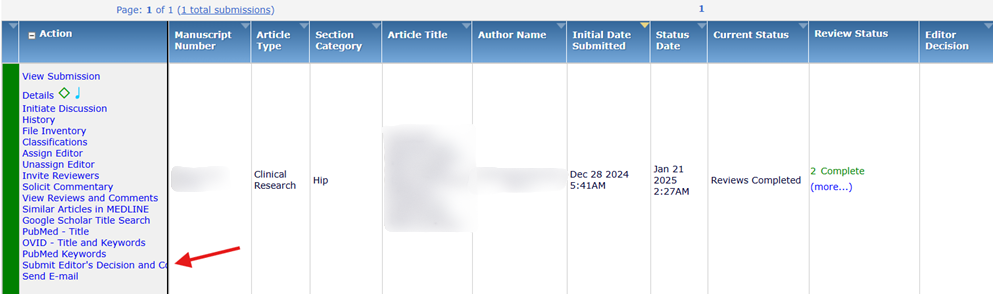
When you are ready to submit a decision, click on the Submissions with Required Reviews Complete folder. Be sure to check that there are no outstanding reviews by looking at the “Review Status” column. Any outstanding reviews or invitations will appear here in orange or red text.
Note: If you submit a decision while there are outstanding reviews, that reviewer(s) will be terminated. We strongly discourage this action, as the reviewer may have already started their review, and we want to be considerate of their time and effort.
Click on the Submit Editor’s Decision and Comments link.
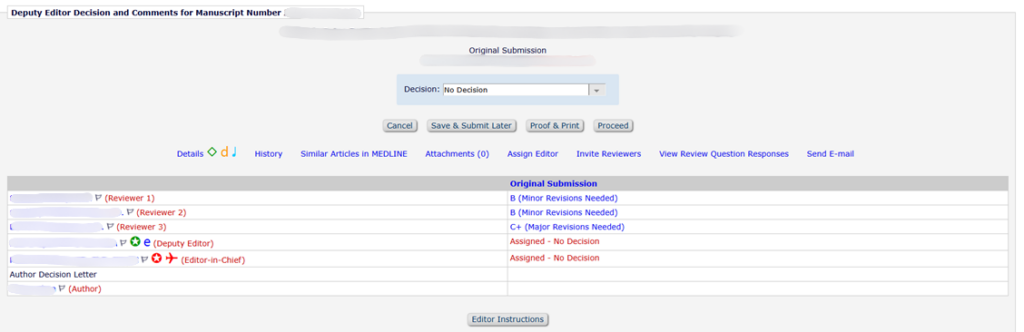
This screen provides an overview of reviewer recommendations and fields containing their comments. Note that reviewers utilize a letter grading system when evaluating manuscripts. The rubric for this system is included at the bottom of this page. Use their grades and comments to inform your decision.
Note: If another editor submitted a decision before you, you may be taken directly to the Draft Decision Letter instead. To navigate back to the Submit Decision page, click on the “Submit New Decision” button above the letter. If you do not wish to change the decision, you may add your comments directly to the draft letter.
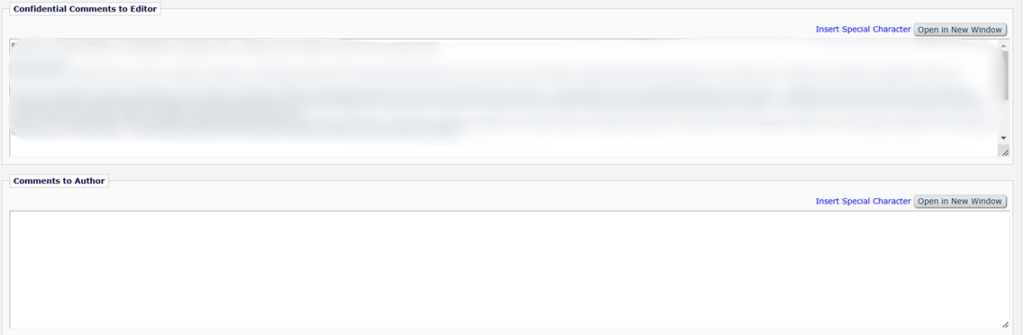
Confidential Comments to Editor:
Reviewer comments that are for your viewing alone and will not appear in the decision letter.
If you are a sub-editor (e.g., Associate Editor) in the workflow chain, you may enter any comments you wish to provide to other editors, e.g., the Senior Editor or EIC, in this field as well. If the manuscript has not yet been reviewed by a Statistics and Methodology Editor and you believe it should be, indicate that here. The Senior Editors will assign these Editors as appropriate.
Comments to Author:
Enter any comments you have for the authors here. They will be automatically loaded into the decision letter following the standard template (similarly to how reviews appear in the letter). Alternatively, you can edit the decision letter template directly to include your comments on the next screen.
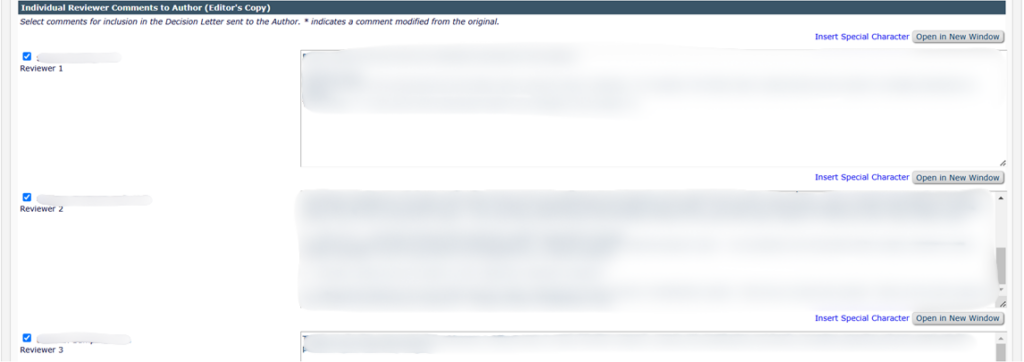
Individual Reviewer Comments to Author:
Each reviewer’s individual comments. You are responsible for reviewing and editing the reviewer comments, including deleting any incorrect, unnecessary, or derogatory comments and any reviewer names (please bring any substantial edits to the attention of the Senior Editor or EIC using the Confidential Comments to Editor box). Any reviewer comments in the Comments to Author boxes automatically feed into the decision letter template and will be sent to the author. If you would like to omit a reviewer’s entire review from the decision letter, uncheck the box next to their name.
If you omit a reviewer’s comments completely, please make note of this in the Production Notes box so that the Editorial staff knows they were not omitted in error. Occasionally reviewers put their comments in the wrong box, i.e., Confidential Comments to the Editor in the Comments to the Author box. Be wary of this and cut and paste between the two boxes as needed before submitting your decision.
Reviewers also have the option to attach reviews as Word documents rather than typing/pasting them directly onto the web page. The authors will not see these comments unless you cut and paste them into the appropriate Reviewer Comment box or make the attachment visible to the authors (see checkbox next to the attachment in the attachments window). Only make it visible if the document does not contain the reviewer’s name or any identifying information.
Rating Reviewers
Before submitting your decision, please rate the reviewers’ performance if another editor has not already done so. Grades can be entered at the bottom of the Submit Editor’s Decision and Comments screen. This helps us remove poor reviewers from our database. A rubric is included below. A grade of 90 and above is considered good to excellent. Reviewers with an average grade of 89 or below are eliminated during the twice annual review of the database.
80-85: Needs Improvement. Extremely brief or generic, lacks manuscript-specific feedback and meaningful assessment of methodology, rigor, or validity. Provides little or no guidance to authors or editors.
86-90: Acceptable. Concise but useful review that provides actionable guidance. Addresses key strengths and weaknesses, and includes some line-by-line comments.
91-95: Good. Thorough and well-structured review providing comments on methodology, rigor, and validity. Thoughtfully assesses impact and relevance, and offers a moderate volume of constructive, line-by-line suggestions.
96-100: Excellent. Comprehensive, balanced, and highly engaged review that demonstrates a deep understanding of the subject matter. Provides detailed comments on methodology, rigor, and validity, as well as relevance and impact, and offers a substantial volume of constructive, line-by-line suggestions.
You may leave any comments for the Editorial staff in the “Production Notes” box located towards the bottom of the page. If you have any very minor edits for a “Ready” paper, these can be noted here for the copyediting department to refer to when editing the final article, rather than requesting another revision from the authors.
From the drop-down Decision menu, select the appropriate decision term and click Proceed.
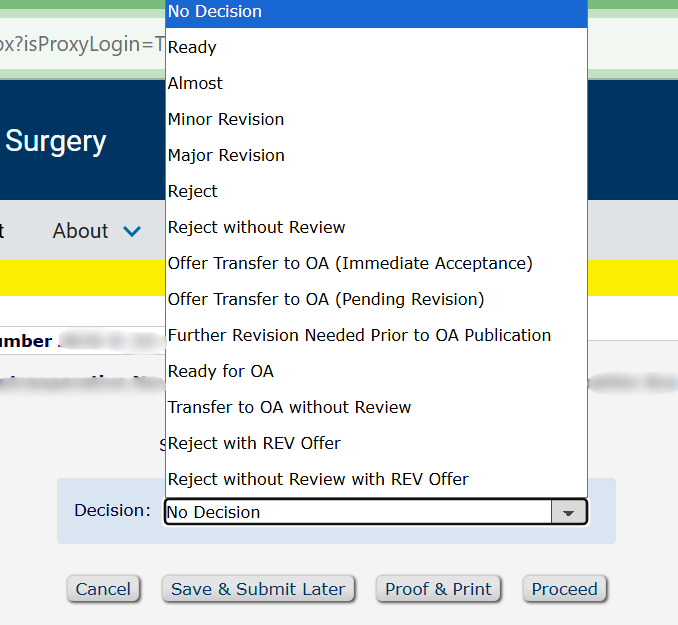
Draft Decision Letter
After clicking Proceed, you will be taken to a screen with a customizable letter. A basic template is automatically loaded in according to the decision you entered on the previous screen. You may choose to edit the letter directly or write your comments below the signature (i.e., alongside the reviewer comments). If you entered your comments on the previous screen, they will be automatically loaded into the letter following the template. Likewise, any reviewer comments automatically feed into the draft decision letter.
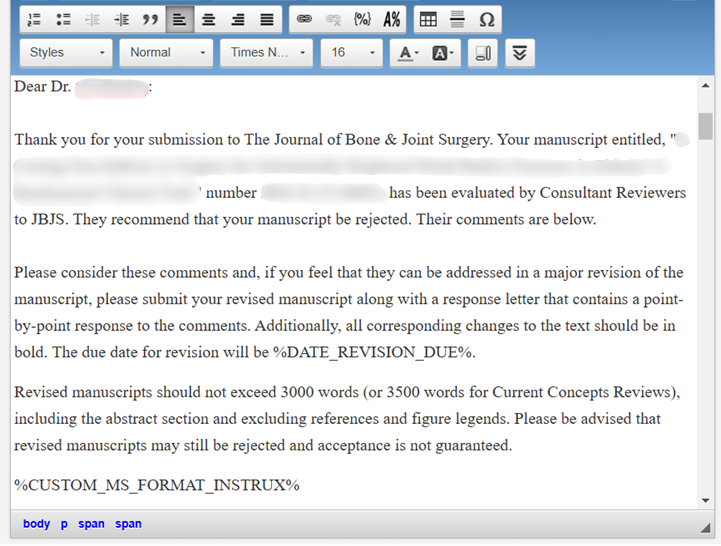
If you edit the template directly, please do not delete any of the merge fields included (Date Revision Due, Format Instrux, Copyright Return, Reviewer or Editor Comments, etc.).
Once the draft letter is complete, click Submit Decision with Draft Letter. The submission will then leave your account.

If you would like to change your decision before sending it, you may select Submit New Decision to go back to the previous screen.
After the decision is submitted, it does not go directly to the author. It must first make its way through the Editor chain for review and approval by all Editors (Senior Editor, EIC, etc.). Upon final approval by the EIC, it is sent to the Editorial Office, who will proofread it before sending it to the author. If, after submitting your decision, you realize that something must be changed, please contact the Editorial Office as quickly as possible.
Reviewer Manuscript Grades
Reviewers are provided with the following rubric when making their recommendations:
- An “A” (Accept) paper is completely suitable for JBJS and will be valued by JBJS readers. It is educational and informative. An “A” paper contains all of the information needed to justify its conclusions and message. It should be published provided it also receives a satisfactory methodologic review and that revisions suggested by both content and methodologic reviews are made and the questions raised by the reviewers are answered. The content may need some revision or restructuring.
- A “B” (Minor Revisions Needed) paper is of value to JBJS readers but has flaws that must be remedied before being accepted. Much of the information concerning “A” papers is applicable here. The essential difference between the “A” and “B” paper is that the material is not complete in the “B” paper. More data or a more detailed description is needed, or more analysis of the data must be provided. The content of the manuscript is of interest and should be subject to methodologic review, and the content reviewer believes that whatever is missing can be provided by the authors.
- A “C+” (Major Revisions Needed) paper is of interest to The Journal’s readership but there are serious concerns about the manuscript. The author is invited to resubmit the paper for re-review if he or she is able to address these concerns, but acceptance is not guaranteed or implied. The assigned Editor has discretion for deciding whether to obtain a methodologic review for this category of papers.
- A “C” (Reject) paper should not be published in JBJS. The subject matter is not suitable for JBJS or the content is not of significant educational value. The reviewer must believe strongly that his or her reservations concerning the manuscript are valid and that the authors cannot correct the deficiencies. Before assigning a “C” recommendation, the Reviewer should be convinced that the manuscript is not suitable. List two or three major reasons why you believe the manuscript should be rejected. If you are convinced that a manuscript should be rejected, it is neither necessary nor desirable to write as detailed a review as is needed when the author is being asked to revise the paper. Be objective and especially careful not to write pejorative comments when rendering a “C” recommendation.
Reviewers may also enter “Did not review” instead of a grade to indicate that they did not complete the review, usually due to a conflict of interest or change in availability. If needed, please invite a new reviewer.